
Neural networks for flood prediction#
This notebook includes boxes with the formatting shown here to list the questions you are expected to answer in your report. You are not expected to write your answers here.
Introduction#
In this assignment, you will apply the techniques you learned for regression in a more realistic problem setting. You will use a synthetic dataset containing 5000 hypothetical cities, with the goal of predicting the probability of flooding under heavy rainfall given a diverse set of features ranging from geographical to policy-related. The goal is to give the model a number of examples for training and have it predict flooding probability for unseen cities.
We will use a neural network, also known as Multilayer Perceptron (MLP), to map these features to flooding probability:

The assignment includes a series of tasks that will give you more intuition into how to work with neural networks:
Data exploration, splitting and normalization
Setting up a training loop with proper mini-batching and validation loss checks
Feature exploration: which inputs are most important and how many to use?
Hyperparameter exploration: how to avoid overfitting when the dataset is really small?
Let us explore each of these points in turn, and by the end you will be able to build simple neural networks for regression with confidence.
Data Exploration#
Let us first load a few packages, download the dataset and take a look at it:
import os
from urllib.request import urlretrieve
import time
import pandas as pd
import numpy as np
import matplotlib.pyplot as plt
from matplotlib.ticker import MaxNLocator

%config InlineBackend.figure_formats = ['svg']

from sklearn.neural_network import MLPRegressor
from sklearn.preprocessing import MinMaxScaler
from sklearn.metrics import mean_squared_error
from sklearn.model_selection import train_test_split
Matplotlib created a temporary cache directory at /tmp/matplotlib-tds6d97i because the default path (/home/jovyan/.cache/matplotlib) is not a writable directory; it is highly recommended to set the MPLCONFIGDIR environment variable to a writable directory, in particular to speed up the import of Matplotlib and to better support multiprocessing.
# Download the dataset (if necessary)
filename = "flood_dataset.csv"
url = "https://github.com/TUDelft-MUDE/source-files/raw/main/file/GA2.6/" + filename

if not os.path.isfile(filename):
    print(f"Downloading {filename}...")
    urlretrieve(url, filename)
data = pd.read_csv(filename)
data.describe()
| rainfall_mm | soil_permeability_mm_per_hr | impervious_surface_pct | groundwater_level_m | wetland_proximity_km | flood_defense_quality | slope_deg | zoning_regulation_strictness | flooding_probability | |
|---|---|---|---|---|---|---|---|---|---|
| count | 5000.000000 | 5000.000000 | 5000.000000 | 5000.000000 | 5000.000000 | 5000.000000 | 5000.000000 | 5000.000000 | 5000.000000 |
| mean | 2234.643271 | 25.432911 | 50.161499 | 5.042564 | 25.010688 | 0.504750 | 14.886441 | 0.507124 | 0.445307 |
| std | 1009.844697 | 14.108835 | 28.637033 | 2.915153 | 14.472669 | 0.287535 | 8.643944 | 0.290909 | 0.361374 |
| min | 501.815605 | 1.015407 | 0.001317 | 0.000192 | 0.008559 | 0.000047 | 0.004278 | 0.000027 | 0.012547 |
| 25% | 1355.428462 | 13.182018 | 24.985991 | 2.501051 | 12.511453 | 0.255574 | 7.201130 | 0.252997 | 0.099216 |
| 50% | 2221.940145 | 25.742230 | 50.516605 | 5.097973 | 24.974793 | 0.502829 | 14.969796 | 0.512453 | 0.347496 |
| 75% | 3120.314233 | 37.373536 | 74.775715 | 7.561161 | 37.867236 | 0.756919 | 22.236174 | 0.761736 | 0.832296 |
| max | 3999.178679 | 49.998874 | 99.994726 | 9.995590 | 49.999124 | 0.999957 | 29.993334 | 0.999909 | 0.999998 |
Here we can see that we have 5000 samples in the dataset, with some features ranging between \([0,1]\) while others have broader ranges. The flooding_probability output has a \([0,1]\) range, as expected. In short, the potential features we can use to predict are:
rainfall_mm: the amount of rain the city sees in a yearsoil_permeability_mm_per_hr: how porous the (uncovered) soil isimpervious_surface_pct: how much of the city surface is impermeablegroundwater_level_m: how close the groundwater level is to the surfacewetland_proximity_km: how close the nearest wetland is to the cityflood_defense_quality: how robust the flood prevention interventions applied to the city areslope_deg: a measure quantifying the average angle of natural slopes within the cityzoning_regulation_strictness: how strictly zoning policies are followed in the city (e.g minimum requirements for park/green areas)
Let us now quickly plot each feature against flooding probability to see what we are dealing with:
target_col = 'flooding_probability'
features = [col for col in data.columns if col != target_col]

fig, axes = plt.subplots(2,4,figsize=(12,6))
axes = axes.flatten()

for i, feature in enumerate(features):
    axes[i].scatter(data[feature], data[target_col],s=0.5,alpha=0.6)
    axes[i].set_xlabel(feature)
    axes[i].set_ylabel(target_col)

plt.tight_layout()
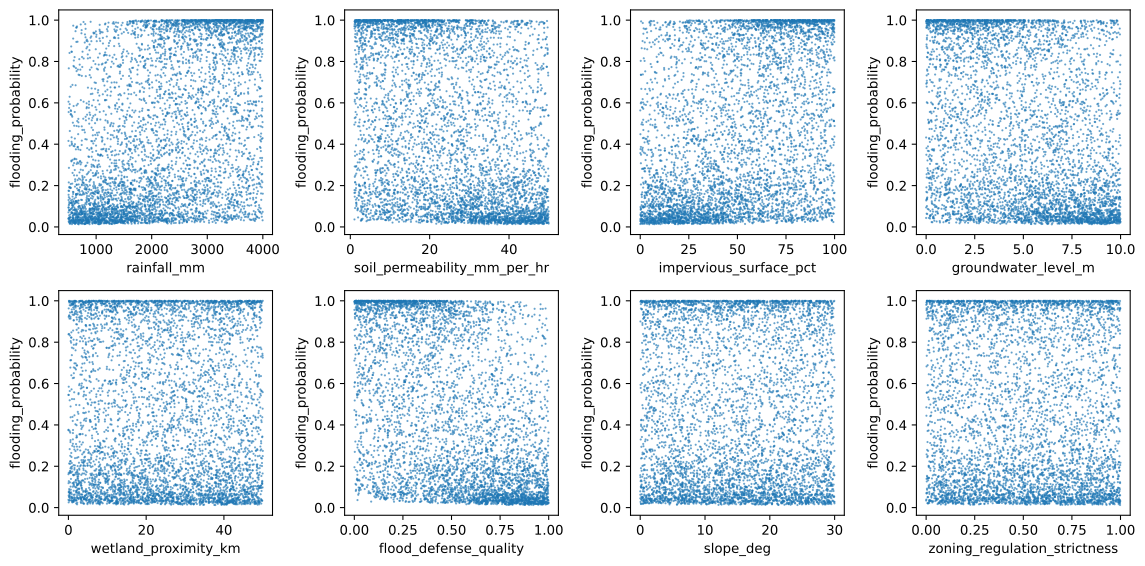
Take a look at the plots above and think about:
How is the flooding probability distributed? Do you already see any patterns?
Do all features correlate with the output in the same way?
Do you expect any one feature to be enough to explain the probability of flooding?
Which features look most important at first glance?
Building and training a network with a single feature#
Let us start with the most intuitive model, mapping rainfall volume to flooding probability. This means our network will have one input and one output. Let us first prepare the data.
Prepare features and targets#
From the data object above we can easily extract our feature and our target. Note how there is only one feature for now:
features = np.array([
                     data['rainfall_mm'],
                    ]).transpose()

targets = data['flooding_probability'].to_numpy().reshape(-1,1)
Training-validation-test split and mini-batching#
In the Programming Assignment this week you have seen how and why we split the dataset in three parts when using machine learning models. Here we do it again but this time more quickly:
Task 1:
Use the train_test_split function from sklearn.model_selection to split our dataset. The dataset consists of features and targets.
The dataset should be split as follows:
80% of the data should go to the training set.
10% of the data should go to the validation set.
10% of the data should go to the test set.
This means that you should use train_test_split() twice, first to split training from validation+test and a second time to split validation from test. Check the documentation of the function to see how the split sizes can be set up.
The splitting should be done in a way that shuffles the data first to ensure that the training, validation, and test sets are representative of the overall distribution of the data. The function takes a random_state integer that seeds shuffler to ensure that the results are reproducible; you can use the values 42 for the first split and 24 for the second split.
The resulting training, validation, and test sets should be stored in the variables X_train, t_train, X_val, t_val, X_test, and t_test.
X_train, X_val_test, t_train, t_val_test = train_test_split(features, targets, test_size=0.20, random_state=42)
X_val, X_test, t_val, t_test = train_test_split(X_val_test, t_val_test, test_size=0.50, random_state=24)
Next we implement a function that will split the training dataset into mini-batches. As we have seen in the lectures, this is a necessary step when training a neural network with Stochastic Gradient Descent (refer to the online book if needed).
def get_mini_batches(X, t, batch_size):
    """
    This function generates mini-batches from the given input data and labels.

    Parameters:
    X (numpy.ndarray): The features.
    t (numpy.ndarray): The targets corresponding to the input data.
    batchsize (int): The size of each mini-batch.

    Returns:
    list: A list of tuples where each tuple contains a mini-batch of the input data and the corresponding targets.
    """
    # Generate permutations
    perm = np.random.permutation(len(X))
    X_train_perm = X[perm]
    t_train_perm = t[perm]

    # Generate mini-batches
    X_batches = []
    t_batches = []
    for i in range(0, len(X_train_perm), batch_size):
        X_batches.append(X_train_perm[i:i+batch_size])
        t_batches.append(t_train_perm[i:i+batch_size])

    return list(zip(X_batches, t_batches))
The following figure illustrates both the way we split the original dataset and how we further split the training set into mini-batches:

Normalization#
Next we normalize our dataset. We have seen during our Workshop why that is an important step in training robust machine learning models. Here we will use the MinMaxScaler from scikit-learn, which scales the data between \(0\) and \(1\):
scaler_x = MinMaxScaler()
scaler_x.fit(X_train)

normalized_X_train = scaler_x.transform(X_train)
normalized_X_val = scaler_x.transform(X_val)

scaler_t = MinMaxScaler()
scaler_t.fit(t_train)

normalized_t_train = scaler_t.transform(t_train)
normalized_t_val = scaler_t.transform(t_val)
Why should the
MinMaxScalerbe fitted on the training data only?Why is it crucial that the exact same scaler is used to transform the validation dataset?
Training#
Now we define a function that will train the neural network for a number of epochs. First we define some training parameters:
learning_rate(float): The learning rate of the optimizer (\(\eta\) in the figure above), how much the network weights \(\mathbf{w}\) will change in the direction of the gradient of the loss function;n_epochs(int): The number of epochs to train the model, i.e how many times the full training dataset will be seen by the network. For now we will only train the model for 20 epochs;batch_size(int): The size of each mini-batch (\(\mathcal{B}\) in the figure above). A small portion of the training dataset. During training, each mini-batch is shown separately to the network until the end of the dataset is reached, marking one training epoch.
Then we build a function that implements a training loop. Review the pages on SGD and neural networks in the book if anything is unclear. We use the Mean Squared Error (MSE) loss function to drive the training, a natural choice that comes out directly from the probabilistic approach we used in class (refer to the slides and videos if needed).
At every epoch, we loop through our mini-batches and update the network for each of them in turn. Crucially, we keep an eye on the validation error while we do this, in order to be able to detect overfitting:
def train_model(model, normalized_X_train, normalized_t_train, normalized_X_val, normalized_t_val, n_epochs, batch_size, learning_rate, verbose=True):
    """
    This function generates mini-batches from the given input data and labels.

    Parameters:
    model (sklearn.neural_network): The neural network model to be trained
    normalized_X_train (numpy.ndarray): Normalized network inputs (training set)
    normalized_t_train (numpy.ndarray): Normalized network targets (training set)
    normalized_X_val (numpy.ndarray): Normalized network inputs (validation set)
    normalized_t_val (numpy.ndarray): Normalized network target (validation set)
    n_epochs (int): Number of epochs the model will be trained for
    batch_size (int): The size of each mini-batch
    learning_rate (float): Factor multiplying loss gradients when updating network weights
    verbose (bool): Turns printing of losses at every epoch on or off

    Returns:
    train_loss_list: A list of training loss values, with n_epochs entries
    val_loss_list: A list of validation loss values, with n_epochs entries
    """

    # Initialize lists for loss values
    epoch_list = []
    train_loss_list = []
    val_loss_list = []
    model.learning_rate_init = learning_rate

    # Frequency for logging the losses
    N_print = 10**(int(np.log10(n_epochs)) - 1)

    # Fix random seed for reproducibility
    np.random.seed(42)

    for epoch in range(n_epochs):

        # Generate mini-batches
        mini_batches = get_mini_batches(normalized_X_train, normalized_t_train, batch_size)

        # Train model on mini-batches
        for X_batch, t_batch in mini_batches:
            model.partial_fit(X_batch, t_batch.flatten())

        if epoch%N_print==0 or epoch==n_epochs-1:
            epoch_list.append(epoch)

            # Compute loss on training set
            train_loss = mean_squared_error(normalized_t_train, model.predict(normalized_X_train))
            train_loss_list.append(train_loss)

            # Compute loss on validation set
            val_loss = mean_squared_error(normalized_t_val, model.predict(normalized_X_val))
            val_loss_list.append(val_loss)

            if verbose:
                print(f"Epoch {epoch+1}/{n_epochs} - Train Loss: {train_loss_list[-1]:.7f} - Val Loss: {val_loss:.7f}")

    return epoch_list, train_loss_list, val_loss_list
The
train_modelfunction tracks the MSE loss for both training and validation datasets. In a case of extreme overfitting, what would you expect to happen with the training loss? What about the validation loss?Looking at the loop in
train_model, training progresses all the way untiln_epochsis reached, regardless of how the validation loss is evolving. This makes the training prone to overfitting. Briefly explain in words how you could modify the code above in order to implement Early Stopping.
Construct a neural network model#
Note how in train_model we rely on a model object that has:
A
predictmethod that computes \(y\) as a function of \(\mathbf{x}\) or multiple predictions stacked in a vector \(\mathbf{y}\) as a function of inputs \(\mathbf{X}\) stacked in matrix formA
partial_fitfunction that performs the SGD update \(\mathbf{w}_\mathrm{new} = \mathbf{w}_\mathrm{old} - \eta\nabla E_\mathcal{B}\) based on a mini-batch.
Scikit-learn provides such a model implementing a simple feed-forward neural network with the MLPRegressor class. It takes the architecture of the network (number of hidden layers, number of neurons) and the activation function of the hidden layers as input, and outputs a model object.
You are tasked with setting up a Multi-Layer Perceptron (MLP). The MLP should have the following characteristics:
The hidden layer sizes are defined as a tuple. For this task we want to have two hidden layers with 10 and 5 neurons, respectively, so we should write:
hidden_layer_sizes=(10,5). Notice that we only specify the hidden layer sizes, the input and output sizes will be automatically inferred when we train the model.The class provides several options for activation function, but in this assignment we will set it to
activation='relu'
The configured MLPRegressor should be stored in a variable named model. We then call the training function we defined above and pass this model as argument.
Training neural networks is a stochastic operation: the MLP is given random initial weights and SGD is random by nature. If you want to make sure you always get the same trained network every time you run the notebook (e.g. for comparison reasons), you can pass random_state=0 (or some other integer) to MLPRegressor
model = MLPRegressor(hidden_layer_sizes = (10, 5),
                    activation = 'relu',
                    random_state=0)
Train the network and track its learning progress#
First of all we train the network you just defined above:
Tip:
If you run this code block twice you will just continue training the same network. If you want to train from zero again you should also rerun the cell above where the model is created.
epoch_list, train_loss_list, val_loss_list = train_model(model,
                                                         normalized_X_train,
                                                         normalized_t_train,
                                                         normalized_X_val,
                                                         normalized_t_val,
                                                         n_epochs=100,
                                                         batch_size=64,
                                                         learning_rate=0.001
                                                        )
Epoch 1/100 - Train Loss: 0.9385475 - Val Loss: 0.8988853
Epoch 11/100 - Train Loss: 0.2377800 - Val Loss: 0.2187144
Epoch 21/100 - Train Loss: 0.1405309 - Val Loss: 0.1359003
Epoch 31/100 - Train Loss: 0.1176267 - Val Loss: 0.1143961
Epoch 41/100 - Train Loss: 0.1101738 - Val Loss: 0.1080991
Epoch 51/100 - Train Loss: 0.1078050 - Val Loss: 0.1063523
Epoch 61/100 - Train Loss: 0.1076643 - Val Loss: 0.1067786
Epoch 71/100 - Train Loss: 0.1072867 - Val Loss: 0.1065223
Epoch 81/100 - Train Loss: 0.1073285 - Val Loss: 0.1065166
Epoch 91/100 - Train Loss: 0.1073654 - Val Loss: 0.1067272
Epoch 100/100 - Train Loss: 0.1072595 - Val Loss: 0.1066012
Use the block below to plot the validation and training loss curves. Add this plot to your report.
# Initialize figure
ax = plt.figure(figsize=(8, 6)).gca()

# Create a scatter plot
plt.scatter(epoch_list, val_loss_list, label='Validation loss', color='red', marker='.', s=100, alpha=0.7, edgecolors='black', linewidths=0.5)
plt.scatter(epoch_list, train_loss_list, label='Training loss', color='blue', marker='.', s=100, alpha=0.7, edgecolors='black', linewidths=0.5)

# Add labels and a legend
plt.xlabel('Epochs', fontsize=14, fontweight='bold')
plt.ylabel('Loss', fontsize=14, fontweight='bold')
plt.title('Loss curves', fontsize=16, fontweight='bold')
plt.legend(loc='upper right', fontsize=12)

# Switch to log-log plot
plt.yscale('log')
plt.xscale('log')

# Customize the grid appearance
plt.grid(True, linestyle='--', alpha=0.5)

# Customize the tick labels
plt.xticks(fontsize=12)
plt.yticks(fontsize=12)

# Wrap up
plt.show()
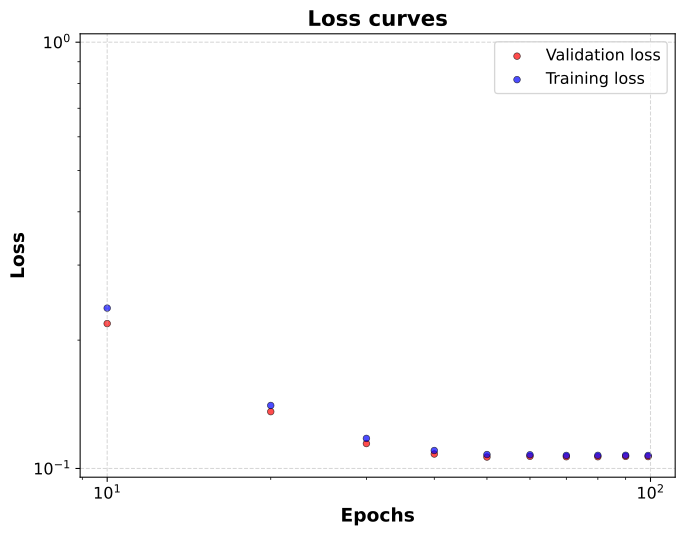
Look at how both loss curves behave in the plot above. Is the model overfitting? Is the network learning during the training process? Is there a need to use more epochs for this particular model?
Evaluate network performance#
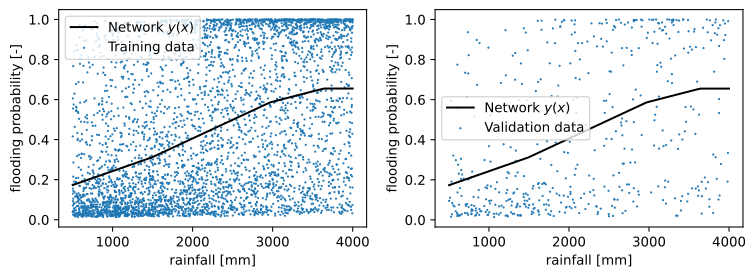
We can also look at how well the model performs. Since we only have one input feature and it is normalized in the \([0,1]\) range, we can easily set a linspace in the same range and compute \(y(x)\) for all of them.
Note how in the code below we de-normalize \(\mathbf{X}\) and also \(\mathbf{y}\), for plotting. The raw output values that come out of the network are not human-readable since it was trained on normalized targets.
# Create a linspace in the normalized x space, scale it back for plotting
normalized_X_range = np.linspace(0,1,100).reshape(-1,1)
X_range = scaler_x.inverse_transform(normalized_X_range)

# Feed normalized X to the network and collect normalized y values. Then scale them back for plotting
normalized_y_range = model.predict(normalized_X_range).reshape(-1,1)
y_range = scaler_t.inverse_transform(normalized_y_range)
Now we just plot everything in two separate plots, first together with the training data and then with the validation data:
fig,axes = plt.subplots(1,2,figsize=(8,3))

# Plot predictions in black, together with all training data
axes[0].plot(X_range, y_range, label=r"Network $y(x)$", color='k')
axes[0].scatter(X_train,t_train,s=0.5, label='Training data')
axes[0].set_xlabel('rainfall [mm]')
axes[0].set_ylabel('flooding probability [-]')

# Plot predictions in black, together with all validation data
axes[1].plot(X_range, y_range,label=r"Network $y(x)$", color='k')
axes[1].scatter(X_val,t_val,s=0.5, label='Validation data')
axes[1].set_xlabel('rainfall [mm]')
axes[1].set_ylabel('flooding probability [-]')

# Wrap up
axes[0].legend()
axes[1].legend()
plt.tight_layout()
plt.show()
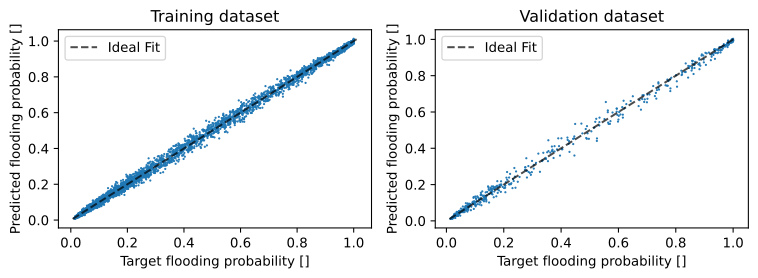
Another convenient way to evaluate performance is through a parity plot. This consists in plotting targets on the x-axis against network predictions on the y-axis, in other words a \(t\) versus \(y\) plot. For a model that always makes perfect predictions, \(y=t\) for all instances of the target, which would make all points in the plot lie on the diagonal line \(y=x\). In practice model predictions are often far from perfect, and this deviation would be seen as the points drifting away from the diagonal.
The following block will do that for you:
# Compute y for the whole training dataset and then denormalize it for plotting
y_train = scaler_t.inverse_transform(model.predict(normalized_X_train).reshape(-1,1))

# Compute y for the whole validation dataset and then denormalize it for plotting
y_val = scaler_t.inverse_transform(model.predict(normalized_X_val).reshape(-1,1))

# Set up the plots
fig,axes = plt.subplots(1,2,figsize=(8,3))

axes[0].set_title('Training dataset')
axes[0].set_xlabel('Target flooding probability []')
axes[0].set_ylabel('Predicted flooding probability []')

axes[1].set_title('Validation dataset')
axes[1].set_xlabel('Target flooding probability []')
axes[1].set_ylabel('Predicted flooding probability []')

# Plot predictions versus targets for both sets
axes[0].scatter(t_train,y_train,s=0.5)
axes[1].scatter(t_val,y_val,s=0.5)

# Plot 'ideal fit' diagonal lines
min_val = min(np.min(t_train), np.min(y_train))
max_val = max(np.max(t_train), np.max(y_train))
axes[0].plot([min_val, max_val], [min_val, max_val], 'k--', label='Ideal Fit', alpha=0.7)
axes[0].legend()

min_val = min(np.min(t_val), np.min(y_val))
max_val = max(np.max(t_val), np.max(y_val))
axes[1].plot([min_val, max_val], [min_val, max_val], 'k--', label='Ideal Fit', alpha=0.7)
axes[1].legend()

# Wrap up
plt.tight_layout()
plt.show()

Look at the parity plots above for the one-feature model. We see that the model is not doing well. Is the model overfitting or underfitting? Why is this happening? Consider the plotted dataset at the top of the notebook to justify your answer.
Are there cities for which even this model gives reasonable flooding probability predictions? Use your parity plots to motivate your answer.
Improving the model by adding input features#
We might be able to improve on the model by adding input features. Repeat the process above until you reach a powerful model for flooding prediction.
Task 4:
Use this block to set up a new neural network that now takes up to five features as inputs. See if you can reach a validation loss lower than \(0.001\)
Remember you need to (i) split your dataset again since it has changed; (ii) normalize features and targets; (iii) adjust the number of epochs until you are sure the model has finished training; (iv) set up an MLPRegressor and call train_model.
Since you are now fitting a more complex function you will need a more complex network. Use a network with three hidden layers with 50 units each for this task. The activation function should remain relu.
With your final network, generate training and validation parity plots and add them to your report. Since this model has more features, the first plotting strategy using linspace is not very informative, so stick to just parity plots.
Tip:
You can do this quickly by copy/pasting code from previous tasks. To avoid problems with running code blocks out of order, make sure all necessary steps are in the same code block.
features = np.array([
                     data['rainfall_mm'],
                     data['flood_defense_quality'],
                     data['impervious_surface_pct'],
                     data['soil_permeability_mm_per_hr'],
                     data['groundwater_level_m']
                    ]).transpose()

targets = data['flooding_probability'].to_numpy().reshape(-1,1)

X_train, X_val_test, t_train, t_val_test = train_test_split(features, targets, test_size=0.20, random_state=42)
X_val, X_test, t_val, t_test = train_test_split(X_val_test, t_val_test, test_size=0.50, random_state=24)

scaler_x = MinMaxScaler()
scaler_x.fit(X_train)

normalized_X_train = scaler_x.transform(X_train)
normalized_X_val = scaler_x.transform(X_val)

scaler_t = MinMaxScaler()
scaler_t.fit(t_train)

normalized_t_train = scaler_t.transform(t_train)
normalized_t_val = scaler_t.transform(t_val)

model = MLPRegressor(hidden_layer_sizes = (50,50,50),
                    activation = 'relu'
                    )

_,_,_ = train_model(model,
                    normalized_X_train,
                    normalized_t_train,
                    normalized_X_val,
                    normalized_t_val,
                    n_epochs=500,
                    batch_size=64,
                    learning_rate=0.001)

# Compute y for the whole training dataset and then denormalize it for plotting
y_train = scaler_t.inverse_transform(model.predict(normalized_X_train).reshape(-1,1))

# Compute y for the whole validation dataset and then denormalize it for plotting
y_val = scaler_t.inverse_transform(model.predict(normalized_X_val).reshape(-1,1))

# Set up the plots
fig,axes = plt.subplots(1,2,figsize=(8,3))

axes[0].set_title('Training dataset')
axes[0].set_xlabel('Target flooding probability []')
axes[0].set_ylabel('Predicted flooding probability []')
axes[1].set_title('Validation dataset')
axes[1].set_xlabel('Target flooding probability []')
axes[1].set_ylabel('Predicted flooding probability []')

# Plot predictions versus targets for both sets
axes[0].scatter(t_train,y_train,s=0.5)
axes[1].scatter(t_val,y_val,s=0.5)

# Plot 'ideal fit' diagonal lines
min_val = min(np.min(t_train), np.min(y_train))
max_val = max(np.max(t_train), np.max(y_train))
axes[0].plot([min_val, max_val], [min_val, max_val], 'k--', label='Ideal Fit', alpha=0.7)
axes[0].legend()

min_val = min(np.min(t_val), np.min(y_val))
max_val = max(np.max(t_val), np.max(y_val))
axes[1].plot([min_val, max_val], [min_val, max_val], 'k--', label='Ideal Fit', alpha=0.7)
axes[1].legend()

# Wrap up
plt.tight_layout()
plt.show()
Epoch 1/500 - Train Loss: 0.0224080 - Val Loss: 0.0209720
Epoch 11/500 - Train Loss: 0.0026915 - Val Loss: 0.0022452
Epoch 21/500 - Train Loss: 0.0011204 - Val Loss: 0.0010806
Epoch 31/500 - Train Loss: 0.0008271 - Val Loss: 0.0008336
Epoch 41/500 - Train Loss: 0.0006811 - Val Loss: 0.0007409
Epoch 51/500 - Train Loss: 0.0006635 - Val Loss: 0.0007756
Epoch 61/500 - Train Loss: 0.0006368 - Val Loss: 0.0007190
Epoch 71/500 - Train Loss: 0.0005574 - Val Loss: 0.0006362
Epoch 81/500 - Train Loss: 0.0005675 - Val Loss: 0.0007090
Epoch 91/500 - Train Loss: 0.0008462 - Val Loss: 0.0008779
Epoch 101/500 - Train Loss: 0.0005343 - Val Loss: 0.0007286
Epoch 111/500 - Train Loss: 0.0004929 - Val Loss: 0.0006705
Epoch 121/500 - Train Loss: 0.0005426 - Val Loss: 0.0006752
Epoch 131/500 - Train Loss: 0.0004622 - Val Loss: 0.0006217
Epoch 141/500 - Train Loss: 0.0005578 - Val Loss: 0.0007577
Epoch 151/500 - Train Loss: 0.0003844 - Val Loss: 0.0005973
Epoch 161/500 - Train Loss: 0.0004469 - Val Loss: 0.0006074
Epoch 171/500 - Train Loss: 0.0003685 - Val Loss: 0.0005585
Epoch 181/500 - Train Loss: 0.0004026 - Val Loss: 0.0005725
Epoch 191/500 - Train Loss: 0.0003572 - Val Loss: 0.0005567
Epoch 201/500 - Train Loss: 0.0006772 - Val Loss: 0.0008270
Epoch 211/500 - Train Loss: 0.0003929 - Val Loss: 0.0006379
Epoch 221/500 - Train Loss: 0.0003576 - Val Loss: 0.0006019
Epoch 231/500 - Train Loss: 0.0003346 - Val Loss: 0.0005846
Epoch 241/500 - Train Loss: 0.0004940 - Val Loss: 0.0007029
Epoch 251/500 - Train Loss: 0.0003735 - Val Loss: 0.0006338
Epoch 261/500 - Train Loss: 0.0004403 - Val Loss: 0.0007381
Epoch 271/500 - Train Loss: 0.0003913 - Val Loss: 0.0006659
Epoch 281/500 - Train Loss: 0.0003471 - Val Loss: 0.0006143
Epoch 291/500 - Train Loss: 0.0003676 - Val Loss: 0.0006303
Epoch 301/500 - Train Loss: 0.0004069 - Val Loss: 0.0006682
Epoch 311/500 - Train Loss: 0.0004846 - Val Loss: 0.0007989
Epoch 321/500 - Train Loss: 0.0003038 - Val Loss: 0.0005426
Epoch 331/500 - Train Loss: 0.0003354 - Val Loss: 0.0005743
Epoch 341/500 - Train Loss: 0.0005188 - Val Loss: 0.0008215
Epoch 351/500 - Train Loss: 0.0003673 - Val Loss: 0.0006578
Epoch 361/500 - Train Loss: 0.0004430 - Val Loss: 0.0006898
Epoch 371/500 - Train Loss: 0.0005132 - Val Loss: 0.0007288
Epoch 381/500 - Train Loss: 0.0004914 - Val Loss: 0.0007243
Epoch 391/500 - Train Loss: 0.0003054 - Val Loss: 0.0005784
Epoch 401/500 - Train Loss: 0.0003419 - Val Loss: 0.0005648
Epoch 411/500 - Train Loss: 0.0003624 - Val Loss: 0.0005924
Epoch 421/500 - Train Loss: 0.0003011 - Val Loss: 0.0005411
Epoch 431/500 - Train Loss: 0.0002986 - Val Loss: 0.0005948
Epoch 441/500 - Train Loss: 0.0003250 - Val Loss: 0.0005849
Epoch 451/500 - Train Loss: 0.0003041 - Val Loss: 0.0005891
Epoch 461/500 - Train Loss: 0.0003762 - Val Loss: 0.0005889
Epoch 471/500 - Train Loss: 0.0003181 - Val Loss: 0.0006172
Epoch 481/500 - Train Loss: 0.0003035 - Val Loss: 0.0005546
Epoch 491/500 - Train Loss: 0.0004530 - Val Loss: 0.0006571
Epoch 500/500 - Train Loss: 0.0002640 - Val Loss: 0.0005227
Looking at the new parity plots, what suggests this model performs better than the previous one?
Comparing training and validation parity plots, is this new model suffering from overfitting?
Avoiding overfitting#
Up until now we have been using a dataset of substantial size, with 5000 samples. In real life such a rich dataset is often not available. What if we only had data from 50 cities?
Task 5:
Instead of splitting the dataset 80%/10%/10% let us simulate a small-dataset situation by tweaking the way we split the dataset. You can do this with the same train_test_split function as before.
Split the dataset into 1% for training, 49.5% for validation and 49.5% for testing. Make sure your training dataset only has 50 samples
Keep the same input features and model you used for the previous task (three hidden layers, 50 units each,
reluactivation)Set
learning_rate=0.001,n_epochs=1000and calltrain_model. You can setverbose=Falseto suppress printing losses per epochMake sure you attain a training loss lower than \(0.0001\)
Plot the training and validation loss evolution during training and make training and validation parity plots. Add those to your report.
Tip:
You can do this quickly by copy/pasting code from previous tasks. To avoid problems with running code blocks out of order, make sure all necessary steps are in the same code block.
features = np.array([
                     data['rainfall_mm'],
                     data['flood_defense_quality'],
                     data['impervious_surface_pct'],
                     data['soil_permeability_mm_per_hr'],
                     data['groundwater_level_m'],
                    ]).transpose()

targets = data['flooding_probability'].to_numpy().reshape(-1,1)

X_train, X_val_test, t_train, t_val_test = train_test_split(features, targets, test_size=0.99, random_state=42)
X_val, X_test, t_val, t_test = train_test_split(X_val_test, t_val_test, test_size=0.50, random_state=24)

scaler_x = MinMaxScaler()
scaler_x.fit(X_train)

normalized_X_train = scaler_x.transform(X_train)
normalized_X_val = scaler_x.transform(X_val)

scaler_t = MinMaxScaler()
scaler_t.fit(t_train)

normalized_t_train = scaler_t.transform(t_train)
normalized_t_val = scaler_t.transform(t_val)

model = MLPRegressor(hidden_layer_sizes = (50,50,50),
                    activation = 'relu')

epoch_list, train_loss_list, val_loss_list = train_model(model,
                                                         normalized_X_train,
                                                         normalized_t_train,
                                                         normalized_X_val,
                                                         normalized_t_val,
                                                         n_epochs=3000,
                                                         batch_size=64,
                                                         learning_rate=0.001,
                                                         verbose=False)

# Compute y for the whole training dataset and then denormalize it for plotting
y_train = scaler_t.inverse_transform(model.predict(normalized_X_train).reshape(-1,1))

# Compute y for the whole validation dataset and then denormalize it for plotting
y_val = scaler_t.inverse_transform(model.predict(normalized_X_val).reshape(-1,1))

# Set up the plots
fig,axes = plt.subplots(1,2,figsize=(8,3))

axes[0].set_title('Training dataset')
axes[0].set_xlabel('Target flooding probability []')
axes[0].set_ylabel('Predicted flooding probability []')
axes[1].set_title('Validation dataset')
axes[1].set_xlabel('Target flooding probability []')
axes[1].set_ylabel('Predicted flooding probability []')

# Plot predictions versus targets for both sets
axes[0].scatter(t_train,y_train,s=0.5)
axes[1].scatter(t_val,y_val,s=0.5)

# Plot 'ideal fit' diagonal lines
min_val = min(np.min(t_train), np.min(y_train))
max_val = max(np.max(t_train), np.max(y_train))
axes[0].plot([min_val, max_val], [min_val, max_val], 'k--', label='Ideal Fit', alpha=0.7)
axes[0].legend()

min_val = min(np.min(t_val), np.min(y_val))
max_val = max(np.max(t_val), np.max(y_val))
axes[1].plot([min_val, max_val], [min_val, max_val], 'k--', label='Ideal Fit', alpha=0.7)
axes[1].legend()

# Wrap up
plt.tight_layout()
plt.show()

# Initialize figure
ax = plt.figure(figsize=(8, 6)).gca()

# Create a scatter plot
plt.scatter(epoch_list, val_loss_list, label='Validation loss', color='red', marker='.', s=100, alpha=0.7, edgecolors='black', linewidths=0.5)
plt.scatter(epoch_list, train_loss_list, label='Training loss', color='blue', marker='.', s=100, alpha=0.7, edgecolors='black', linewidths=0.5)

# Add labels and a legend
plt.xlabel('Epochs', fontsize=14, fontweight='bold')
plt.ylabel('Loss', fontsize=14, fontweight='bold')
plt.title('Loss curves', fontsize=16, fontweight='bold')
plt.legend(loc='upper right', fontsize=12)

# Switch to log-log plot
plt.yscale('log')
plt.xscale('log')

# Customize the grid appearance
plt.grid(True, linestyle='--', alpha=0.5)

# Customize the tick labels
plt.xticks(fontsize=12)
plt.yticks(fontsize=12)

# Wrap up
plt.show()
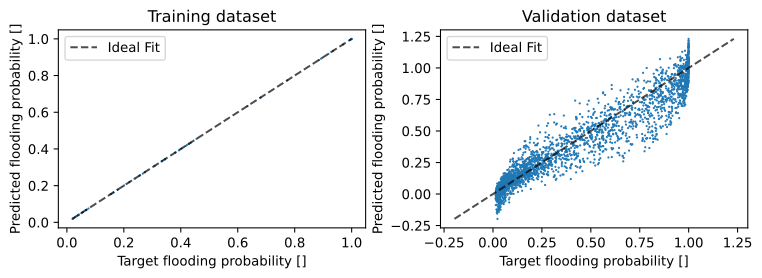
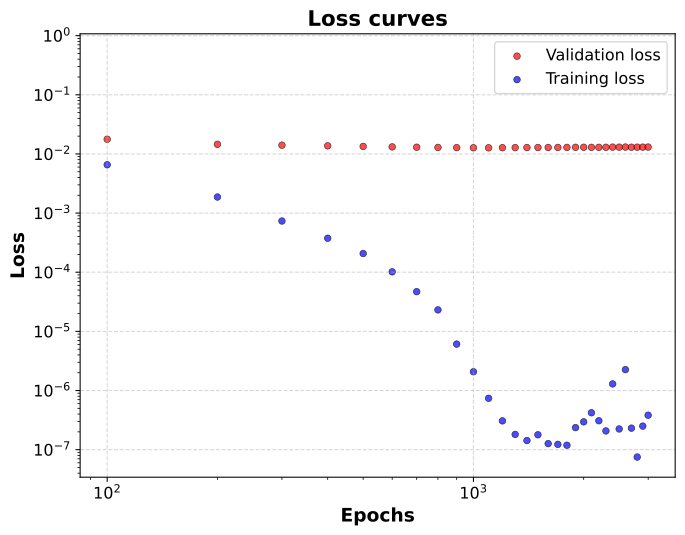
Looking at all of your new plots, what are the signs this new model is suffering from overfitting? What is the root cause for the overfitting?
Model Selection#
Okay, so we have just seen that too complex models might be a problem. But it also makes sense that too rigid models should also be avoided. So how large does the model need to be in the end?
Let us try to see whether we can find a reasonable model size by trying out different numbers of layers and layer sizes. This is a process which we called Model Selection during the lectures. The crucial point is that we should look exclusively at the validation loss when selecting models, as minimizing training loss will always lead to overfitting.
Task 6:
For this final task go back to splitting the dataset 80%/10%/10%. Keep the input features the same as in the previous tasks.
Now use a grid-search strategy to find hyperparameters that give the best prediction on the validation set. Vary the number of layers and number of hidden units per layer. You can assume that all the hidden layers have the same number of hidden units.
Set up lists for layer_sizes and layer_numbers to create a grid of models to be tested. You can also set the number of networks n_models to be trained for each architecture. Since network weights are initialized randomly, every trained model is unique and the loss might therefore fluctuate. This code will take an average of the losses for each architecture. You do not need to code anything else.
Do not be too ambitious with your setup, the number of models to be trained is n_trainings*len(layer_sizes)*len(layer_numbers), so if you use too many combinations the block will take a while to run. As a general tip, avoid using more than three hidden layers, more than 100 units per layer and more than 5 models per architecture. Start slow!
On the second block we plot the final validation losses of all the models on a grid as a kind of heatmap. Add this plot to your report.
# Split the dataset 80/10/10%
X_train, X_val_test, t_train, t_val_test = train_test_split(features, targets, test_size=0.20, random_state=42)
X_val, X_test, t_val, t_test = train_test_split(X_val_test, t_val_test, test_size=0.50, random_state=24)

# Fit normalizers
scaler_x = MinMaxScaler()
scaler_x.fit(X_train)

scaler_t = MinMaxScaler()
scaler_t.fit(t_train)

# Normalize the datasets
normalized_X_train = scaler_x.transform(X_train)
normalized_X_val = scaler_x.transform(X_val)

normalized_t_train = scaler_t.transform(t_train)
normalized_t_val = scaler_t.transform(t_val)

# Models to try
layer_sizes = [5, 20, 50, 100]
layer_numbers = [1, 2, 3, 4]
n_models = 5

# Create a grid for the coordinate pairs and store them in an array
val_loss_grid = np.zeros((len(layer_sizes), len(layer_numbers)))

# Loop over all the layer sizes
for i, lsize in enumerate(layer_sizes):

    # Loop over all numbers of hidden layers
    for j, lnumber in enumerate(layer_numbers):

        # get tuple of hidden layer sizes
        layers = (lsize,) * lnumber
        print("Training NN with hidden layers:  {}".format(layers))

        # Create the ANN model with the given architecture
        # Changing random_state guarantees each trained network will have unique weights
        for k in range(n_models):
            model = MLPRegressor(hidden_layer_sizes=layers, activation='relu', random_state=k, alpha=0)

            _, _,  val_loss_list = train_model(model,
                                               normalized_X_train,
                                               normalized_t_train,
                                               normalized_X_val,
                                               normalized_t_val,
                                               n_epochs=200,
                                               batch_size=64,
                                               learning_rate=0.001,
                                               verbose=False
                                               )

            print("  Model",k,"validation loss: {:.4e}".format(val_loss_list[-1]))
            val_loss_grid[i,j] += val_loss_list[-1]/float(n_models)

        print("     Average validation loss:    {:.4e}\n".format(val_loss_grid[i,j]))


# Extract the hyperparameters that gave the lowest loss and print
min_size, min_number = np.unravel_index(np.argmin(val_loss_grid), val_loss_grid.shape)
print("\n\nModel with {} layers and {} neurons per layer gave lowest loss of {:.4e}".format(layer_numbers[min_number], layer_sizes[min_size], val_loss_grid[min_size, min_number]))
Training NN with hidden layers:  (5,)
  Model 0 validation loss: 1.0691e-02
  Model 1 validation loss: 7.6450e-03
  Model 2 validation loss: 1.6362e-02
  Model 3 validation loss: 1.6479e-02
  Model 4 validation loss: 1.3331e-02
     Average validation loss:    1.2901e-02

Training NN with hidden layers:  (5, 5)
  Model 0 validation loss: 1.1259e-02
  Model 1 validation loss: 5.9932e-03
  Model 2 validation loss: 1.0975e-02
  Model 3 validation loss: 8.3493e-03
  Model 4 validation loss: 4.6254e-03
     Average validation loss:    8.2404e-03

Training NN with hidden layers:  (5, 5, 5)
  Model 0 validation loss: 8.2475e-03
  Model 1 validation loss: 6.3147e-03
  Model 2 validation loss: 6.6332e-03
  Model 3 validation loss: 5.6846e-03
  Model 4 validation loss: 5.2408e-03
     Average validation loss:    6.4242e-03

Training NN with hidden layers:  (5, 5, 5, 5)
  Model 0 validation loss: 6.7701e-03
  Model 1 validation loss: 7.1741e-03
  Model 2 validation loss: 1.0991e-02
  Model 3 validation loss: 7.5814e-03
  Model 4 validation loss: 5.3062e-03
     Average validation loss:    7.5646e-03

Training NN with hidden layers:  (20,)
  Model 0 validation loss: 4.3845e-03
  Model 1 validation loss: 3.8577e-03
  Model 2 validation loss: 6.0332e-03
  Model 3 validation loss: 4.2402e-03
  Model 4 validation loss: 4.1998e-03
     Average validation loss:    4.5431e-03

Training NN with hidden layers:  (20, 20)
  Model 0 validation loss: 1.4707e-03
  Model 1 validation loss: 2.4430e-03
  Model 2 validation loss: 1.7322e-03
  Model 3 validation loss: 1.8836e-03
  Model 4 validation loss: 1.3694e-03
     Average validation loss:    1.7798e-03

Training NN with hidden layers:  (20, 20, 20)
  Model 0 validation loss: 8.9479e-04
  Model 1 validation loss: 8.0163e-04
  Model 2 validation loss: 1.4315e-03
  Model 3 validation loss: 1.0158e-03
  Model 4 validation loss: 1.2151e-03
     Average validation loss:    1.0718e-03

Training NN with hidden layers:  (20, 20, 20, 20)
  Model 0 validation loss: 8.4536e-04
  Model 1 validation loss: 8.4614e-04
  Model 2 validation loss: 7.5474e-04
  Model 3 validation loss: 1.1383e-03
  Model 4 validation loss: 8.2820e-04
     Average validation loss:    8.8254e-04

Training NN with hidden layers:  (50,)
  Model 0 validation loss: 2.0117e-03
  Model 1 validation loss: 1.7821e-03
  Model 2 validation loss: 2.2806e-03
  Model 3 validation loss: 1.8906e-03
  Model 4 validation loss: 1.8932e-03
     Average validation loss:    1.9716e-03

Training NN with hidden layers:  (50, 50)
  Model 0 validation loss: 1.1810e-03
  Model 1 validation loss: 7.9271e-04
  Model 2 validation loss: 7.8440e-04
  Model 3 validation loss: 7.8781e-04
  Model 4 validation loss: 8.1086e-04
     Average validation loss:    8.7136e-04

Training NN with hidden layers:  (50, 50, 50)
  Model 0 validation loss: 7.2277e-04
  Model 1 validation loss: 7.2156e-04
  Model 2 validation loss: 6.1812e-04
  Model 3 validation loss: 8.0155e-04
  Model 4 validation loss: 6.3689e-04
     Average validation loss:    7.0018e-04

Training NN with hidden layers:  (50, 50, 50, 50)
  Model 0 validation loss: 6.1433e-04
  Model 1 validation loss: 7.4795e-04
  Model 2 validation loss: 6.5136e-04
  Model 3 validation loss: 6.5381e-04
  Model 4 validation loss: 6.0125e-04
     Average validation loss:    6.5374e-04

Training NN with hidden layers:  (100,)
  Model 0 validation loss: 1.3544e-03
  Model 1 validation loss: 1.2747e-03
  Model 2 validation loss: 1.3778e-03
  Model 3 validation loss: 1.5345e-03
  Model 4 validation loss: 1.7084e-03
     Average validation loss:    1.4500e-03

Training NN with hidden layers:  (100, 100)
  Model 0 validation loss: 6.2739e-04
  Model 1 validation loss: 7.3195e-04
  Model 2 validation loss: 6.8312e-04
  Model 3 validation loss: 7.4452e-04
  Model 4 validation loss: 6.2068e-04
     Average validation loss:    6.8153e-04

Training NN with hidden layers:  (100, 100, 100)
  Model 0 validation loss: 6.0817e-04
  Model 1 validation loss: 5.7865e-04
  Model 2 validation loss: 7.2706e-04
  Model 3 validation loss: 6.4043e-04
  Model 4 validation loss: 6.8117e-04
     Average validation loss:    6.4710e-04

Training NN with hidden layers:  (100, 100, 100, 100)
  Model 0 validation loss: 6.6481e-04
  Model 1 validation loss: 5.5508e-04
  Model 2 validation loss: 5.4326e-04
  Model 3 validation loss: 6.4822e-04
  Model 4 validation loss: 6.1805e-04
     Average validation loss:    6.0588e-04


Model with 4 layers and 100 neurons per layer gave lowest loss of 6.0588e-04
# Define the row and column labels
rows = layer_sizes
cols = layer_numbers

plt.figure(figsize=(10, 10))
plt.imshow(val_loss_grid, cmap='viridis', interpolation='nearest')

# Add a colorbar
plt.colorbar(label='Validation Loss')

# Colorbar range, you can tweak this to soften the influence of very high or very low values
# plt.clim(0.01,0.001)

# Add the row and column labels
plt.xticks(range(len(cols)), cols)
plt.yticks(range(len(rows)), rows)

plt.xlabel('Number of Layers')
plt.ylabel('Number of Neurons')

plt.title('Validation Loss Grid')
plt.show()
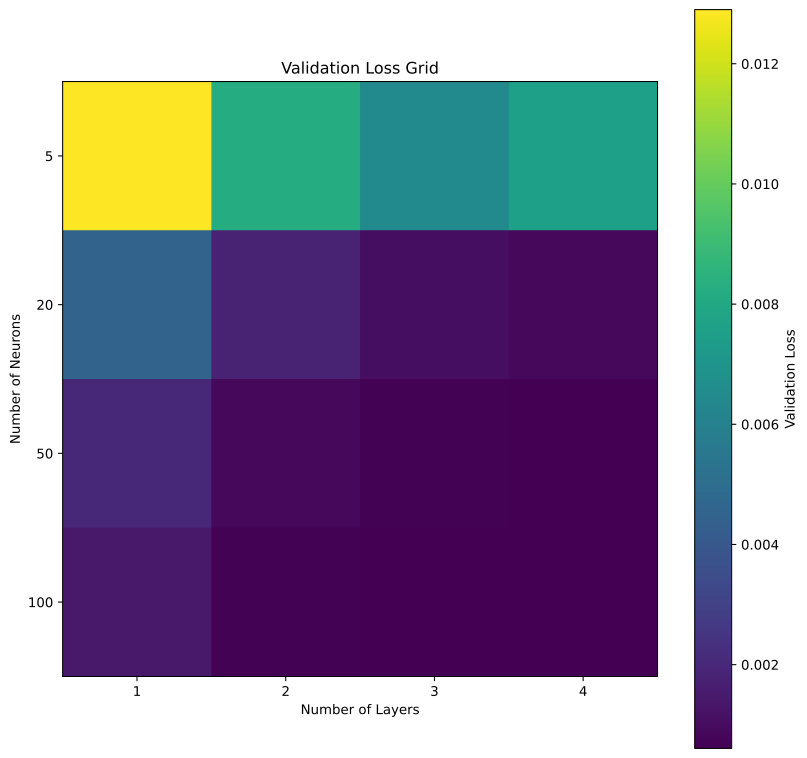
Given a comprehensive list of layer sizes and numbers, we would in theory expect the top left region of the heatmap to have high validation errors. Why is that?
Following up on the previous question, we would also expect the bottom right region of the heatmap to have high validation errors since those models would suffer from overfitting. Why do we not see it happening here? Think about what changed between Task 5 and Task 6.
By Iuri Rocha, Delft University of Technology. CC BY 4.0, more info on the Credits page of Workbook