
Train/validation/test splits#
Overview#
In this assignment you need to implement an algorithm that takes a dataset and splits it (randomly) into 3 parts for use in a machine learning application: one set for training, validation, and testing. This operation is necessary to set up, validate and improve the model you have implemented.
import numpy as np
import matplotlib.pyplot as plt
import os
import pandas as pd
from urllib.request import urlretrieve
Load the data#
We first need to load the data and ensure that these are properly stored in specific arrays. The file we use in this assignment is data.csv. It contains four columns and 100 entries for each of the columns.
We use the pandas library to load the dataset and print a simple description of its contents:
def findfile(fname):
    if not os.path.isfile(fname):
        print(f"Downloading {fname}...")
        urlretrieve('https://github.com/TUDelft-MUDE/source-files/raw/main/file/PA2.6/'+fname, fname)

findfile('data.csv')
Downloading data.csv...
data = pd.read_csv('data.csv')
data.describe()
| X1 | X2 | X3 | Y | |
|---|---|---|---|---|
| count | 100.000000 | 100.000000 | 100.000000 | 100.00000 |
| mean | 0.470300 | 0.498200 | 0.517900 | 1.95180 |
| std | 0.297432 | 0.293383 | 0.292986 | 1.26048 |
| min | 0.010000 | 0.010000 | 0.010000 | -0.51000 |
| 25% | 0.195000 | 0.240000 | 0.277500 | 1.04000 |
| 50% | 0.465000 | 0.505000 | 0.565000 | 1.96000 |
| 75% | 0.730000 | 0.765000 | 0.755000 | 2.80000 |
| max | 0.990000 | 0.990000 | 0.990000 | 5.38000 |
After loading the data, we’ll separate it into two arrays: X for input variables and Y for the output variable. We’ll use all three input variables (X1, X2 and X3) to build X. Each input feature should be a column on X, each sample should be a row of X.
X = np.array(data[['X1', 'X2', 'X3']])
Y = np.array(data['Y'])

print("First 5 values for input data (X):")
print(X[:5])
print("First 5 values for output data (Y):")
print(Y[:5])
First 5 values for input data (X):
[[0.37 0.03 0.64]
 [0.95 0.64 0.08]
 [0.73 0.31 0.16]
 [0.6  0.51 0.9 ]
 [0.16 0.91 0.61]]
First 5 values for output data (Y):
[0.21 3.41 3.3  2.15 1.43]
Reproducible randomness#
Training machine learning models in general and neural networks in specific is a process laden with randomness, more specifically in the following ways:
We split our dataset into training, validation and test parts, and it is usual to first shuffle our dataset to avoid biases (this is the subject of this PA)
Neural nets have weights \(\mathbf{w}\) which are initialized with random values and subsequently modified during training. These random values will form the initial point in weight space from which the network will be trained
We use Stochastic Gradient Descent for training, which further splits the training set into minibatches. At every epoch, the training dataset is therefore shuffled again and split into minibatches
With all these sources of randomness, it is important that we keep our experiments reproducible (always obtain the same outcomes when running the code multiple times). We will use numpy.random to generate random numbers (documentation page here), where typical usage is as follows:
Create a random number generator by initializing an instance of the
Generatorclass with the methodnp.random.default_rngUse one of the numerous methods of this class to generate random samples
But if we just do it directly the generated numbers will always be different whenever you run the notebook again, as you are about to see.
Task 1:
Use the cell below to get a taste of what types of random data can be generated by numpy.random.
Run the block several times. Do you always get the same numbers?
rng = np.random.default_rng()

print('integers:', rng.integers(5)) # generates an integer between 0 and 4
print('random:', rng.random(5)) # generates 5 random numbers in the [0,1] interval
print('choice:', rng.choice(np.array(5))) # pick an entry from an array at random
integers: 4
random: [0.51906931 0.91981816 0.40127322 0.27251056 0.42008187]
choice: 4
As you can see this generates randomness, but not in a controlled way. To make it reproducible, we pass a seed to our Random Number Generator. A seed is an integer that will condition the RNG to generate numbers that are still random, but in a way that running the code again will always generate the same random numbers.
Task 2:
Run the same code as before but now pass a seed=42 argument when creating rng.
Run the block several times. Do you always get the same numbers?
rng_new = np.random.default_rng(seed=42)

print('integers:', rng_new.integers(5)) # generates an integer between 0 and 4
print('random:', rng_new.random(5)) # generates 5 random numbers in the [0,1] interval
print('choice:', rng_new.choice(np.array(5))) # pick an entry from an array at random
integers: 0
random: [0.43887844 0.85859792 0.69736803 0.09417735 0.97562235]
choice: 3
Great! Now back to machine learning.
Randomly shuffle the data#
It is important to split the data such that they are randomly distributed across the train, validation, and test sets. This is easily carried out in Python with the Numpy package. We will use the default methods from np.random for that.
Let us first look at a simple example. Let us assume a dummy dataset with four samples:
dummy_x = np.array([1.0, 2.0, 3.0, 4.0])
dummy_y = np.array([0.1, 0.2, 0.3, 0.4])
Where these can be seen as samples coming from a ground truth function \(y=0.1x\). Now we would like to shuffle this dataset. And of course we would like to shuffle the two arrays together. First we look at the wrong way to do it, then we do it properly.
Task 3 (the wrong way):
Use rng.permutation to shuffle dummy_x and dummy_y separately. Print them and verify that they are not correctly shuffled.
Pass seed=42 to the RNG.
rng = np.random.default_rng(seed=42)

shuffled_x = rng.permutation(dummy_x)
shuffled_y = rng.permutation(dummy_y)

print(shuffled_x,shuffled_y)
[4. 3. 2. 1.] [0.4 0.3 0.1 0.2]
By making two rng.permutation() calls we are shuffling dummy_x and dummy_y in a different way, making our dataset inconsistent. Let us now do it properly:
Task 4 (the right way):
Use rng.permutation to first create a shuffled array of indices of size \(4\) (the length of the arrays to be shuffled). Then use this same array to index both dummy_x and dummy_y. Print them and verity that they are now correctly shuffled.
Pass seed=42 to the RNG.
rng = np.random.default_rng(seed=42)

shuffled_indices = rng.permutation(4)

shuffled_x = dummy_x[shuffled_indices]
shuffled_y = dummy_y[shuffled_indices]

print('The randomized indices are:', shuffled_indices)
print('The randomized arrays are:', shuffled_x, shuffled_y)

# repeat the same experiment, but without re-seeding the rng
shuffled_indices = rng.permutation(4)

shuffled_x = dummy_x[shuffled_indices]
shuffled_y = dummy_y[shuffled_indices]

print('The randomized indices are:', shuffled_indices)
print('The randomized arrays are:', shuffled_x, shuffled_y)
The randomized indices are: [3 2 1 0]
The randomized arrays are: [4. 3. 2. 1.] [0.4 0.3 0.2 0.1]
The randomized indices are: [3 2 0 1]
The randomized arrays are: [4. 3. 1. 2.] [0.4 0.3 0.1 0.2]
As you can see, if we just call rng.permutation() again without reinitializing the RNG, we will of course get a different shuffle, as expected. Randomness is therefore preserved, but controlled. If you run the same block again you will get the same two exact shuffles every single time.
Implement data splitting#
Now that the data is loaded and we know how to shuffle it, you need to split the datasets into a training, validation and testing dataset. First we will write a function, then apply it.
Task 5:
Implement a function to create six arrays: X_train, X_val, X_test, Y_train, Y_val, and Y_test in the file split.py. Read the docstring to ensure it is set up correctly.
\(\text{Tip:}\)
Use the code from previous tasks to randomly access the data from the X and Y arrays.
\(\text{Use Asserts!:}\)
The split_data function below can fail in certain cases, such as when: the input arrays are not the same length, the proportions don’t add up to 1 or there aren’t 3 proportions. Additionally if the implementation has a small error, such as an off-by-one indexing bug, code can break later down the line. These requirements for the function to work correctly can be called its “contract” - a set of conditions it should satisfy. In some programming languages these contracts are built in through concepts such as static type checking (you don’t need to worry about this though), but we don’t have that luxury in Python. Instead, you can use assert statements as a way to enforce conditions on your code. For this, you can try adding a contract to split_data through pre-conditions and post-conditions. Pre-conditions check the data coming in satisfies the contract and post-conditions check that the data coming out satisfies the contract. Use asserts to do this, and check the following conditions:
- `X` and `Y` are the same length.
- `proportions` has length 3.
- The values in `proportions` add up to 1. In practice it might be vanishingly close to one, so check that the sum is close enough to 1.
- The lengths of `X_train`, `X_val` and `X_test` added together are equal to the length of `X` (we don't need to check this for `Y` due to the condition 1, but it never hurts to do so).
To implement this task, uncomment the 4 lines below with assert statements and add the appropriate condition, as described by the string. Note the simple form of an assert statement: assert expression[, assertion_message].
Your task is to fill in the expression! You can test this out by using the function in a way that violates the contract (once implemented), which will result in the assertion_message.
from split import split_data
Task 6:
Use your function to split the arrays X and Y from Task 1 into training, validation, and test sets. The split proportions should be 70% for training, 20% for validation, and 10% for the test dataset.
Pass seed=42 to the RNG.
rng = np.random.default_rng(seed=42)

split_proportions = [0.7, 0.2, 0.1]

(X_train, X_val, X_test,
 Y_train, Y_val, Y_test) = split_data(X, Y, split_proportions, rng)
Task 7:
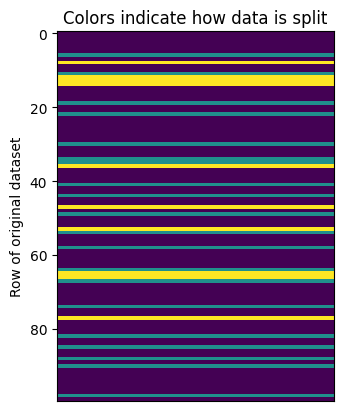
Run the cell below to check whether or not you have implemented the function correctly. The output will present a string output summarizing the number of data allocated to each set, whereas the figure will use colors to illustrate whether or not the values were shuffled in a random way.
def plot_allocation(X, Y,
                    X_train, X_val, X_test,
                    Y_train, Y_val, Y_test):

    set_of_X_and_Y = np.hstack((X,Y.reshape((100,1))))
    # use many (arbitrary) columns to make plot wider
    which_set_am_i = np.zeros((len(Y), 75))

    for i in range(len(X_train)):
        matching_rows = np.all(X==X_train[i], axis=1)
        which_set_am_i[np.where(matching_rows)[0],:] = 1
    for i in range(len(X_val)):
        matching_rows = np.all(X==X_val[i], axis=1)
        which_set_am_i[np.where(matching_rows)[0],:] = 2

    for i in range(len(X_test)):
        matching_rows = np.all(X==X_test[i], axis=1)
        which_set_am_i[np.where(matching_rows)[0],:] = 3

    fig, ax = plt.subplots()
    ax.imshow(which_set_am_i)

    ax.set_title('Colors indicate how data is split')
    ax.set_xticks([])
    ax.set_ylabel('Row of original dataset')

    print('The number of data in each set is:')
    print(f'       training: {sum(which_set_am_i[:,0]==1)}')
    print(f'     validation: {sum(which_set_am_i[:,0]==2)}')
    print(f'        testing: {sum(which_set_am_i[:,0]==3)}')
    print(f'  none of above: {sum(which_set_am_i[:,0]==0)}')

plot_allocation(X, Y,
                X_train, X_val, X_test,
                Y_train, Y_val, Y_test)
The number of data in each set is:
       training: 70
     validation: 20
        testing: 10
  none of above: 0
By Iuri Rocha, Delft University of Technology. CC BY 4.0, more info on the Credits page of Workbook.